- Select the Recipe Navigator tab.
How?
- Select a recipe in the Navigator treeview.
- On the Action menu, point to Other Actions, then click Add
to Grocery List.
- or -
Right-click on the navigator pane and then, on the popup menu, point to Action,
then click Add to Grocery List.
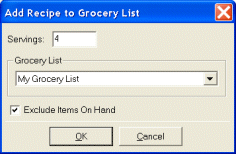
- Enter the number of servings to add to the grocery list in the Servings
box .
- Select a grocery list from the Grocery List list.
Tip Click New Grocery List to create
a new grocery list.
Tip Click Exclude items on hand if
you want items you already have from being added to the grocery list.
- Click OK.
