- Select the Ingredient Navigator tab.
How?
- On the Action menu, point to Search and click Ingredients.
- or -
Right-click on the navigator treeview, point to Search and click Ingredients.
- or -
Click Search  on
the main toolbar.
on
the main toolbar.
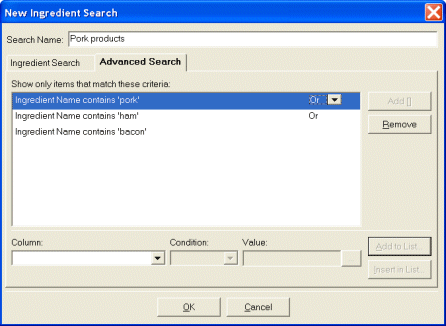
- Click the Advanced Search tab.
- Select the database column you want to include in your search in the Column
list.
- Select the condition from the Condition list.
- Type the value in the Value box.
- Click Add to List to add it to the list of active search criteria.
- Repeat steps 4 to 7 for each additional search criterion.
Tip If you enter two or more criteria, you
can change the boolean operator (i.e., "And" or "Or") by clicking on a criterion
and selecting a new boolean operator from the list.
Tip If you enter three or more criteria, you
can add braces to your expression by selecting two or more adjacent criteria
and clicking on Add [].
- Type the name of your search in the Search Name box (e.g., "Low
Fat, Low Calorie Ingredients" or "Ingredients That Are Good For
Me ".
Tip Giving your search a meaningful name will
help you find it the next time you need it.
- Click OK.
